-
Shop
- Adidas
- Advanced Technologies
- AI Skills Mastery 2026 Collection
- Behavior & Emotions
- Best-Sellers
- Budget, Small-Space & DIY
- Car Accessories
- Daily Routines & Care
- Dating & Social Skills
- Digital Resources
- Education & Learning
- Emotional Intelligence
- Everyday Tech Guides
- Family & Lifestyle Tech
- Family & Parenting
- Fashion
- Alexander McQueen
- Bags
- Bags & Wallets
- Balenciaga
- Belts
- Blazers
- Bottega Veneta
- Brunello Cucinelli
- Burberry
- Chanel
- Chloé
- Dior
- Dolce & Gabbana
- Dresses
- Etro
- Fendi
- Gucci
- Hats & Hair Accessories
- Jewelry
- Jil Sander
- Keychains
- Kiton
- Luggage
- Miu Miu
- Off-White
- Outerwear
- Prada
- Rick Owens
- Saint Laurent
- Shoes
- Socks & Tights
- Sunglasses
- The Row
- Tom Ford
- Valentino
- Valentino Garavani
- Versace
- Vivienne Westwood
- Watches
- Feeding & Nutrition
- Furniture
- Gadgets
- Health & Beauty
- Health & Wellness
- Home & Garden
- Home Styling & Organization
- Home Supplies
- Household Cleaning Guides
- Kids & Babies
- Kitchen
- Kitchen & Cooking
- Lighting
- Makeovers & Layouts
- Nike
- Nutrition & Hydration
- Parenting & Family Life
- Patio, Lawn & Garden
- Personal Growth
- Pet Care
- Pet Supplies
- Pets
- Productivity
- Safety & Health
- Sleep & Bedtime
- Smart Homes & Daily Tech Use
- Smartphones & Mobile Devices
- Sport & Outdoors
- Style & Atmosphere
- Training & Enrichment
- Travel
- Wealth
- Popular
- Best deals
Best Noise-Rejecting Microphones: Dynamic Cardioid Picks
Which microphone cancels the most noise?
The microphones that cancel the most noise are dynamic cardioid (or supercardioid) microphones used close to your mouth. In real rooms with keyboards, fans, and street noise, a well-positioned dynamic mic typically rejects more background sound than most condenser mics because it’s less sensitive and focuses more on what’s directly in front of it. Models marketed for broadcast and streaming often excel here, especially when paired with tight pickup patterns and proper technique.
What actually determines “most” noise canceling
Microphones don’t “cancel” noise the way headphones do; they reduce unwanted sound mainly through pickup pattern, sensitivity, and distance. A cardioid or supercardioid pattern rejects sound from the sides and rear, while keeping your voice prominent when you speak close to the capsule. That’s why a mic that sounds great across the room can sound “noisier” in a typical gaming or home office setup.
Best real-world choice: close-miked dynamic cardioid
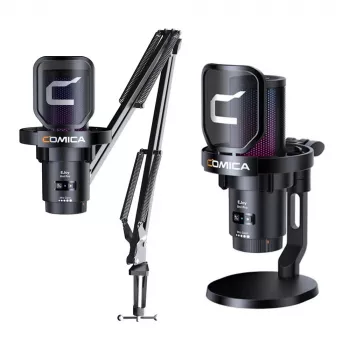
If maximum noise reduction is the priority, use a dynamic cardioid mic on a boom arm and keep it about 2–4 inches from your mouth. This lets you lower input gain, which drops room noise dramatically. Add a pop filter or windscreen to control plosives, and point the mic’s “null” (the most rejecting side) toward your noisiest source—like a mechanical keyboard or PC exhaust.
When USB gaming mics can still do well
Some USB gaming mics include built-in noise suppression or software filters, which can help, but they work best after you’ve nailed placement and gain. If you want a practical setup walkthrough—boom arm positioning, RGB USB mic tuning, and noise tips—see the full guide here: https://etellium.com/blog/guide-wireless-rgb-usb-gaming-mic-setup-boom-arm-noise-tips/.
FAQ
How can I reduce keyboard noise in my microphone?
Move the mic closer to your mouth, lower the gain, and aim the back of the mic toward the keyboard. A boom arm plus a cardioid pickup pattern usually makes the biggest difference, and light noise suppression can clean up what remains.















Leave a comment