-
Shop
- Adidas
- Advanced Technologies
- AI Skills Mastery 2026 Collection
- Behavior & Emotions
- Best-Sellers
- Budget, Small-Space & DIY
- Car Accessories
- Daily Routines & Care
- Dating & Social Skills
- Digital Resources
- Education & Learning
- Emotional Intelligence
- Everyday Tech Guides
- Family & Lifestyle Tech
- Family & Parenting
- Fashion
- Alexander McQueen
- Bags
- Bags & Wallets
- Balenciaga
- Belts
- Blazers
- Bottega Veneta
- Brunello Cucinelli
- Burberry
- Chanel
- Chloé
- Dior
- Dolce & Gabbana
- Dresses
- Etro
- Fendi
- Gucci
- Hats & Hair Accessories
- Jewelry
- Jil Sander
- Keychains
- Kiton
- Luggage
- Miu Miu
- Off-White
- Outerwear
- Prada
- Rick Owens
- Saint Laurent
- Shoes
- Socks & Tights
- Sunglasses
- The Row
- Tom Ford
- Valentino
- Valentino Garavani
- Versace
- Vivienne Westwood
- Watches
- Feeding & Nutrition
- Furniture
- Gadgets
- Health & Beauty
- Health & Wellness
- Home & Garden
- Home Styling & Organization
- Home Supplies
- Household Cleaning Guides
- Kids & Babies
- Kitchen
- Kitchen & Cooking
- Lighting
- Makeovers & Layouts
- Nike
- Nutrition & Hydration
- Parenting & Family Life
- Patio, Lawn & Garden
- Personal Growth
- Pet Care
- Pet Supplies
- Pets
- Productivity
- Safety & Health
- Sleep & Bedtime
- Smart Homes & Daily Tech Use
- Smartphones & Mobile Devices
- Sport & Outdoors
- Style & Atmosphere
- Training & Enrichment
- Travel
- Wealth
- Popular
- Best deals
Wireless RGB USB Mic Setup: Boom Arm & Noise Tips
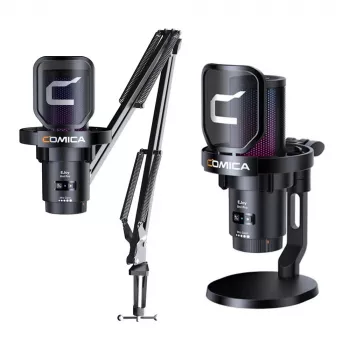
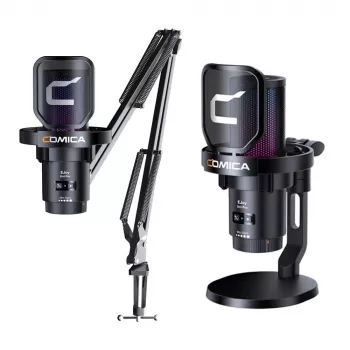
Wireless RGB USB Gaming Microphone with Noise Cancellation & Boom Arm: What Changes (and What to Set Up First)
Clear comms can change a match, a stream, or a late-night co-op session. A wireless USB mic adds freedom of movement, while noise cancellation helps keep keyboard clicks, fans, and room echo from overpowering your voice. This guide covers what to expect from a wireless RGB gaming microphone with a boom arm, how to set it up neatly, and how to tune it for voice chat and streaming without sounding harsh or “processed.”
What This Mic Setup Is Designed to Improve
A wireless RGB USB gaming microphone on a boom arm is mainly about consistency: consistent mic placement, consistent voice level, and fewer distractions for teammates or viewers.
- Cleaner voice pickup for team chat, streaming, and calls without needing an audio interface
- Wireless convenience to reduce cable clutter and keep the desk setup flexible
- Noise control to reduce common distractions like mechanical keyboards, PC fans, and room noise
- Better positioning with a boom arm to keep the mic close while staying out of the frame
- RGB lighting for desk aesthetics and quick visual status cues (where supported)
If you’re looking for a compact all-in-one option, the Wireless RGB USB Gaming Microphone with Noise Cancellation & Boom Arm is built around that “close mic, low mess” workflow that improves intelligibility in fast callouts.
Key Features to Look For (and Why They Matter)
Two gamers can buy similar-looking mics and get totally different results, mostly because of placement, monitoring, and how aggressive their noise suppression is set. These are the features that impact day-to-day performance the most:
- Wireless link stability: prioritize a consistent connection and low dropouts for live chat.
- USB compatibility: plug-and-play is the goal on PC; confirm support if you plan to use a console.
- Noise cancellation approach: hardware-based, software-based, or both—each can sound different at higher settings.
- Mic monitoring and mute control: a quick mute button prevents “hot mic” moments; monitoring helps keep you from shouting.
- Boom arm build: clamp strength, joint tension, and smooth movement determine whether you actually keep the mic close.
- RGB controls: make sure brightness/modes can be adjusted (or shut off) for dark rooms.
| Feature | Why it helps | Quick check during setup |
|---|---|---|
| Boom arm positioning | Keeps the mic close for clearer voice at lower gain | Mic is 6–10 inches from mouth; not blocking monitor |
| Noise cancellation | Reduces background distractions in voice chat | Test keyboard clicks and fan noise while speaking |
| Wireless operation | Cleaner desk and easier repositioning | No crackles, pops, or dropouts during 10–15 minutes of chat |
| USB connection | Plug-and-play convenience for most PCs | Recognized as an input device; correct input selected in apps |
| Mute button/indicator | Prevents accidental hot-mic moments | Mute toggles reliably; indicator is visible |
| RGB lighting control | Aesthetic and visibility benefits | Modes/brightness adjusted or turned off easily |
Getting the Best Sound: Placement, Gain, and Room Control
The fastest way to make a USB mic sound expensive is to put it in the right place and keep gain under control.
If you run into device selection issues, Microsoft’s guide on audio troubleshooting can help confirm the mic is chosen as the correct input device: Fix sound or audio problems in Windows.
Noise Cancellation for Gaming: What It Does Well (and What It Can Break)
For Discord-specific input quirks (robotic artifacts, cut-outs, or device switching), use the official guidance to narrow down settings and device routing: Discord Voice and Video Troubleshooting.
Wireless Practicalities: Latency, Battery, and Reliability Habits
Boom Arm Setup for Comfort and a Cleaner Desk
For larger setups where you want more room for the clamp and arm travel, a spacious surface can help. If you’re building a multi-use workspace, the 70.8″ Rustic Brown Farmhouse Dining Table for 6-8 People – Industrial Wood Style can function as a wide workstation for streaming gear, monitors, and a boom arm mount.
Who This Setup Fits Best
Product Snapshot and What to Expect Day to Day
If you’re streaming, confirm your mic input and filters inside your broadcasting software; OBS includes extensive setup references here: OBS Studio Documentation.
| Item | Current price | Availability |
|---|---|---|
| Wireless RGB USB Gaming Microphone with Noise Cancellation & Boom Arm | $59.51 | In stock |
FAQ
Are noise canceling mics good for gaming?
Yes—when tuned moderately, they can reduce fan and keyboard noise and make callouts easier to understand. If cancellation is too aggressive, it can distort your voice or clip the beginning and end of words, so it’s worth testing and dialing it back until speech sounds natural.
Are USB mics good for gaming?
USB mics are a strong choice for gaming because setup is simple and voice quality can beat most headset mics. The biggest wins come from keeping the mic close to your mouth and making sure the correct input device is selected in Windows and your chat app.
Are wireless gaming microphones worth it?
They’re worth it for a cleaner desk, flexible positioning, and shared setups—as long as the wireless connection is stable. The main trade-offs are battery management and occasional interference, which is usually solved by better receiver placement and a less congested USB port.















Leave a comment