USB Mics for Gaming: Worth It for Voice Chat & Streams?
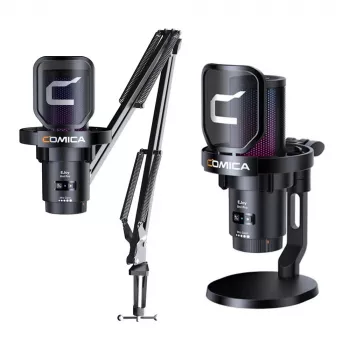
Are USB mics good for gaming?
Yes—USB microphones are often excellent for gaming, especially if the goal is clearer voice chat, better stream audio, or more professional-sounding comms without complicated gear. They’re designed to plug straight into a PC (and sometimes consoles) and typically deliver a noticeable jump in clarity over most headset mics.
Why USB mics work well for gamers
The biggest advantage is simplicity. A USB mic skips the need for an audio interface, XLR cables, or extra power. Many models also include useful gamer-friendly features like onboard mute buttons, gain knobs, and headphone monitoring so it’s easy to control your voice mid-match.
Sound quality is another strong point. Even affordable USB mics can capture more detail and reduce the “tinny” sound common with headset microphones. That can make callouts easier to understand and keep your voice from getting lost under game audio.
What to watch out for
USB mics can pick up more of the room—keyboard clicks, controller taps, PC fans, and echo—because they’re often more sensitive than headset mics. Placement and settings matter: positioning the mic closer to your mouth and lowering gain usually helps more than cranking volume. A boom arm, pop filter, and basic noise controls can also make a big difference in keeping your audio clean.
USB mic vs. headset mic vs. XLR
If convenience and consistent voice quality are the priority, USB is a sweet spot. Headset mics win on portability and background rejection (since they sit close to your mouth), while XLR setups can offer the highest ceiling for sound and expandability—but with more cost and complexity. For most gamers, a solid USB mic plus good placement delivers a near “set it and forget it” experience.
For a step-by-step look at mounting, wireless options, RGB setups, and noise tips, see the full guide here: wireless RGB USB gaming mic setup guide.
FAQ
What’s the best mic placement for gaming voice chat?
Keep the mic 6–10 inches from your mouth, slightly off to the side to reduce plosives, and aim it toward your voice. Lower the gain and speak at a steady volume to prevent it from picking up more room noise than necessary.















Leave a comment