-
Shop
- Adidas
- Advanced Technologies
- AI Skills Mastery 2026 Collection
- Behavior & Emotions
- Best-Sellers
- Budget, Small-Space & DIY
- Car Accessories
- Daily Routines & Care
- Dating & Social Skills
- Digital Resources
- Education & Learning
- Emotional Intelligence
- Everyday Tech Guides
- Family & Lifestyle Tech
- Family & Parenting
- Fashion
- Alexander McQueen
- Bags
- Bags & Wallets
- Balenciaga
- Belts
- Blazers
- Bottega Veneta
- Brunello Cucinelli
- Burberry
- Chanel
- Chloé
- Dior
- Dolce & Gabbana
- Dresses
- Etro
- Fendi
- Gucci
- Hats & Hair Accessories
- Jewelry
- Jil Sander
- Keychains
- Kiton
- Luggage
- Miu Miu
- Off-White
- Outerwear
- Prada
- Rick Owens
- Saint Laurent
- Shoes
- Socks & Tights
- Sunglasses
- The Row
- Tom Ford
- Valentino
- Valentino Garavani
- Versace
- Vivienne Westwood
- Watches
- Feeding & Nutrition
- Furniture
- Gadgets
- Health & Beauty
- Health & Wellness
- Home & Garden
- Home Styling & Organization
- Home Supplies
- Household Cleaning Guides
- Kids & Babies
- Kitchen
- Kitchen & Cooking
- Lighting
- Makeovers & Layouts
- Nike
- Nutrition & Hydration
- Parenting & Family Life
- Patio, Lawn & Garden
- Personal Growth
- Pet Care
- Pet Supplies
- Pets
- Productivity
- Safety & Health
- Sleep & Bedtime
- Smart Homes & Daily Tech Use
- Smartphones & Mobile Devices
- Sport & Outdoors
- Style & Atmosphere
- Training & Enrichment
- Travel
- Wealth
- Popular
- Best deals
Boom Mic for Gaming: Better Comms, Less Noise?

Is a boom mic good for gaming?
Yes—using a boom mic can be a great move for gaming, especially if you want clearer voice chat, less background noise, and a cleaner desk setup. A boom arm (or boom-mounted mic) lets you position the microphone close to your mouth without blocking your monitor or taking up mouse space, which is one of the easiest ways to improve how teammates hear you.
Why a boom setup can sound better than a desk mic
Mic placement matters as much as the mic itself. With a boom arm, you can keep the capsule 4–8 inches from your mouth, aimed slightly off-axis to reduce plosives and breath noise. That closer, consistent distance boosts your voice level while letting you lower gain—often reducing room echo, keyboard clacks, and PC fan noise compared to a mic sitting farther away on the desk.
When a boom mic is especially useful
A boom is ideal if you play competitive games where comms are constant, stream occasionally, or share a room with other noise sources. It also helps if you type a lot or have a mechanical keyboard, since the mic can be positioned above and away from the keys while still staying close to your mouth.
Potential downsides to consider
A boom arm adds a little setup time and needs a stable mounting point (desk clamp or grommet). Cheaper arms can sag or transmit bumps if you hit the desk. Also, if you frequently lean back, turn your head, or game from the couch, a fixed-position boom may be less convenient than a headset mic.
How to get the most out of a boom mic for gaming
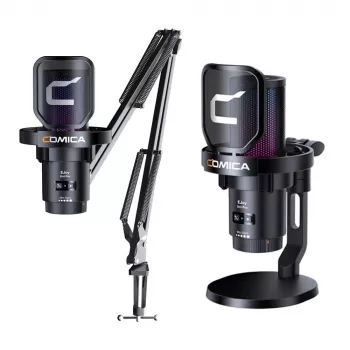
Use a shock mount if possible, keep the mic slightly to the side of your mouth, and set gain so your loudest callouts don’t clip. If your mic supports it, use a noise gate or noise suppression sparingly to avoid cutting off syllables. For a step-by-step setup (including wireless/RGB USB options, boom arm placement, and noise tips), see this gaming mic boom arm setup guide.
FAQ
Do I need a boom arm for a USB gaming microphone?
No—USB mics work fine on a desk stand, but a boom arm makes it easier to place the mic closer to your mouth, which usually improves clarity and reduces room noise.
Recommended for you


Best Colors for Red Hair: Palettes & Outfit Formulas
May 14, 2026













Leave a comment