-
Shop
- Adidas
- Advanced Technologies
- AI Skills Mastery 2026 Collection
- Behavior & Emotions
- Best-Sellers
- Budget, Small-Space & DIY
- Car Accessories
- Daily Routines & Care
- Dating & Social Skills
- Digital Resources
- Education & Learning
- Emotional Intelligence
- Everyday Tech Guides
- Family & Lifestyle Tech
- Family & Parenting
- Fashion
- Alexander McQueen
- Bags
- Bags & Wallets
- Balenciaga
- Belts
- Blazers
- Bottega Veneta
- Brunello Cucinelli
- Burberry
- Chanel
- Chloé
- Dior
- Dolce & Gabbana
- Dresses
- Etro
- Fendi
- Gucci
- Hats & Hair Accessories
- Jewelry
- Jil Sander
- Keychains
- Kiton
- Luggage
- Miu Miu
- Off-White
- Outerwear
- Prada
- Rick Owens
- Saint Laurent
- Shoes
- Socks & Tights
- Sunglasses
- The Row
- Tom Ford
- Valentino
- Valentino Garavani
- Versace
- Vivienne Westwood
- Watches
- Feeding & Nutrition
- Furniture
- Gadgets
- Health & Beauty
- Health & Wellness
- Home & Garden
- Home Styling & Organization
- Home Supplies
- Household Cleaning Guides
- Kids & Babies
- Kitchen
- Kitchen & Cooking
- Lighting
- Makeovers & Layouts
- Nike
- Nutrition & Hydration
- Parenting & Family Life
- Patio, Lawn & Garden
- Personal Growth
- Pet Care
- Pet Supplies
- Pets
- Productivity
- Safety & Health
- Sleep & Bedtime
- Smart Homes & Daily Tech Use
- Smartphones & Mobile Devices
- Sport & Outdoors
- Style & Atmosphere
- Training & Enrichment
- Travel
- Wealth
- Popular
- Best deals
Wireless Gaming Mics: Worth It or Stick to Wired?
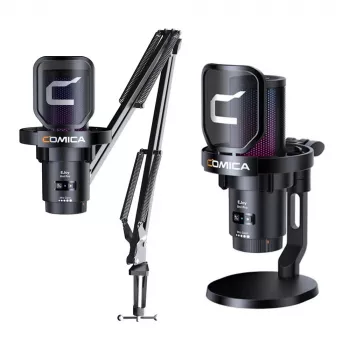
Are wireless gaming microphones worth it?
Wireless gaming microphones can be worth it if your setup benefits from freedom of movement, a cleaner desk, and flexible placement—especially for streamers, console players, and anyone who hates cable clutter. The biggest payoff is convenience: you can reposition your mic, shift between seating positions, or move to a different spot in the room without dragging a cable across your keyboard, boom arm, or controller.
That said, “worth it” depends on whether the wireless trade-offs matter for how you play and record. Many wireless mics sound good for voice chat and casual streaming, but wired options still tend to win on consistency and simplicity. If your priority is maximum audio reliability with minimal fuss, a quality wired USB mic is often the better value.
When wireless is a smart buy
Wireless makes sense if you frequently adjust your mic position, play on a couch or across the room, or want a cleaner-looking RGB gaming setup with fewer cables. It’s also helpful when your desk already has limited USB ports or when you’re using a boom arm and want fewer wires to manage.
What to watch out for
Battery life and charging habits become part of your routine. Wireless can also introduce occasional interference, dropouts, or added latency depending on the connection method and your environment. Another practical factor is monitoring: some wireless models have fewer options for zero-latency headphone monitoring or onboard controls compared to popular wired USB mics.
How to get the best results
If you go wireless, prioritize stable connectivity, easy gain/mute controls, and a pickup pattern that fits your room (cardioid is common for reducing background noise). Pairing it with good placement and noise control matters as much as the mic itself. For hands-on setup tips—like boom arm positioning, RGB USB mic configuration, and reducing noise—see the full guide here: https://etellium.com/blog/guide-wireless-rgb-usb-gaming-mic-setup-boom-arm-noise-tips/.
FAQ
Do wireless gaming microphones have noticeable latency?
Most are fine for voice chat, but latency can be noticeable in certain setups—especially if you rely on live monitoring. Models with strong wireless protocols and proper monitoring features minimize the issue.















Leave a comment